Limited Time Early Access · 60% OFF · $25 $60
Buy now — receive all upcoming updates for free, including the full v1.0 release

What it can do?

Preview-it™ renders live thumbnails directly above each your Geometry Nodes to show real-time geometry and attribute data. No extra viewer nodes, no extra group hacks, no rerouting, no guessing — change any value and instantly see how each node affects your geometry, fields data, selections, and custom attributes.

Designed for complex Geometry Nodes workflows: all zones, nested groups, named attributes, captured attributes — all processed fast in a background process that keeps your Blender responsive.

Upcoming releases will bring support for Shader Editor nodes, allowing live previews for material graphs as well.

Work Smarter, Not Harder

Working with Geometry Nodes can get messy fast — especially when graphs grow complex. Instead of constantly checking the viewport, wiring temporary viewers, or digging through the spreadsheet, Preview-it™ gives you instant visual feedback for every node at once: geometry, fields, selections and attributes.
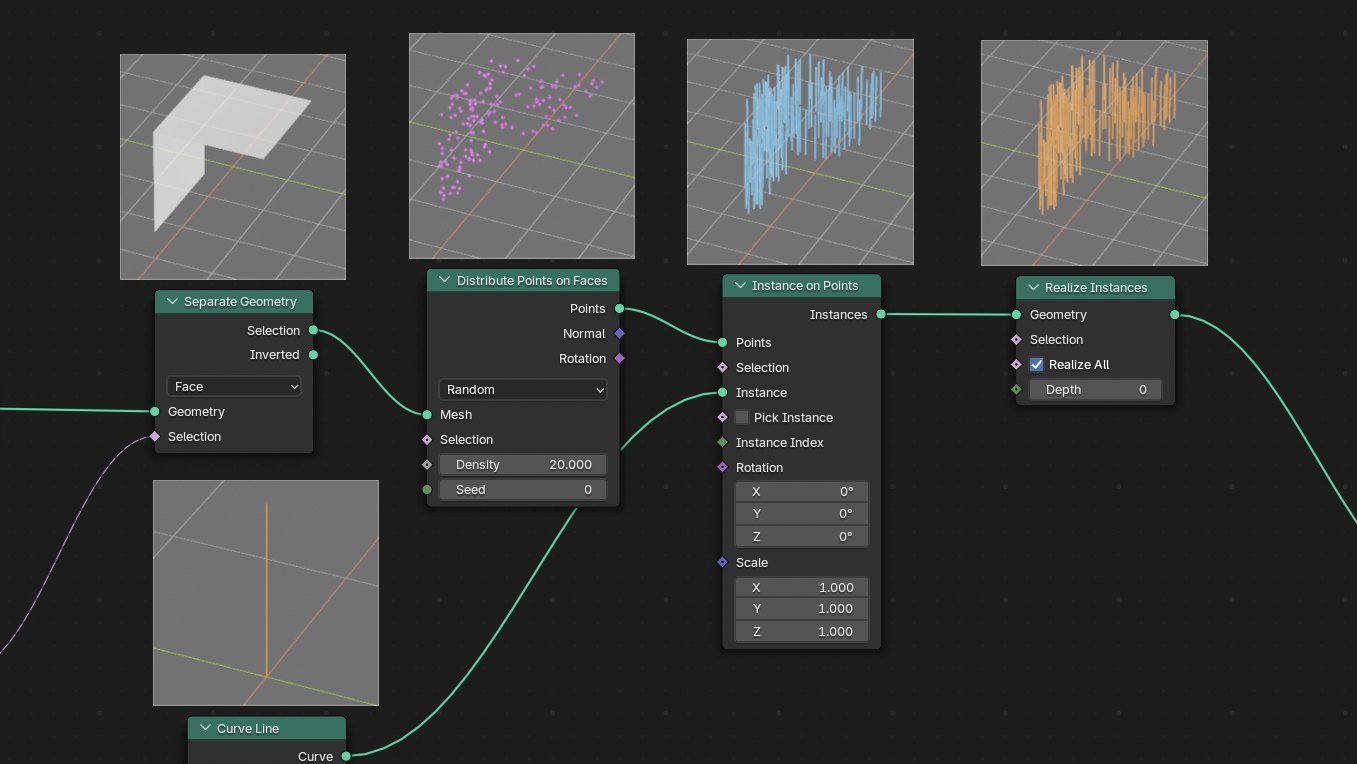
Need to understand what each node is doing — or why nothing is coming through? Preview-it™ color-codes every geometry type (points, faces, instances, curves), so you instantly see what’s happening across all nodes including zones.
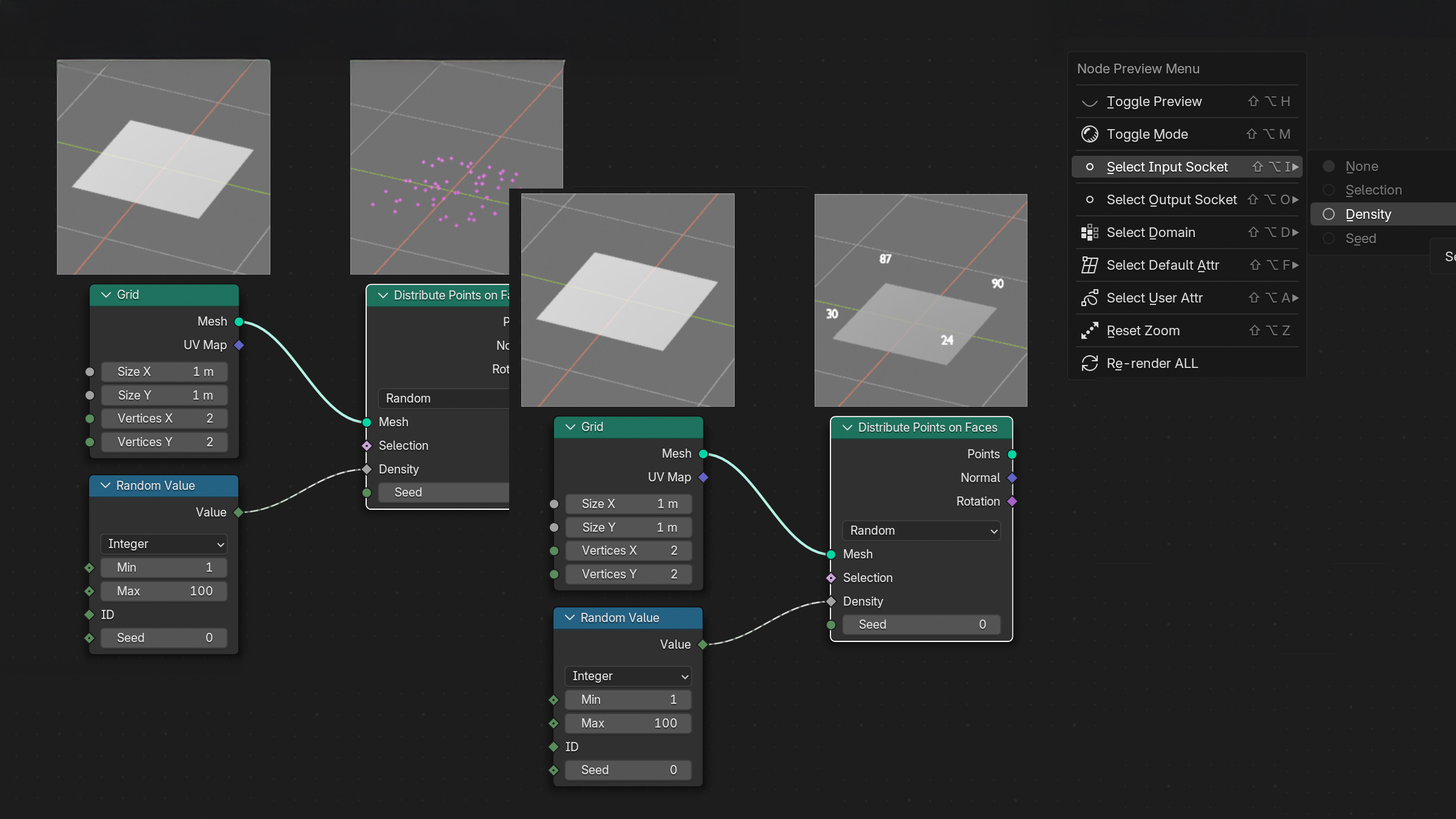
Want to see what a node is actually receiving through its input socket? Preview-it™ displays incoming values as a live field (values, vectors) based on the node’s domain — so instead of endlessly switching nodes into a Viewer or reading the spreadsheet, you can see everything directly in the node preview.
Not sure what your Selection socket is actually picking? Preview-it™ highlights selected vs. rejected geometry directly in the preview, making masks, thresholds and comparisons instantly clear.
Need to quickly inspect index, ID, position or other built-in attributes? Preview-it™ shows a node’s default attributes for the selected domain, giving you a clear view of how Blender handles the data.
Working with Named Attribute or Capture Attribute? Preview-it™ shows your saved attributes next to default ones and makes it easy to see how they evolve and change across nodes, groups and zones.
Every preview has its own camera controls — orbit, pan and zoom the render view. Zoom into tiny details, pull back to see the whole shape, and debug like a dedicated viewer, all without leaving the node editor.
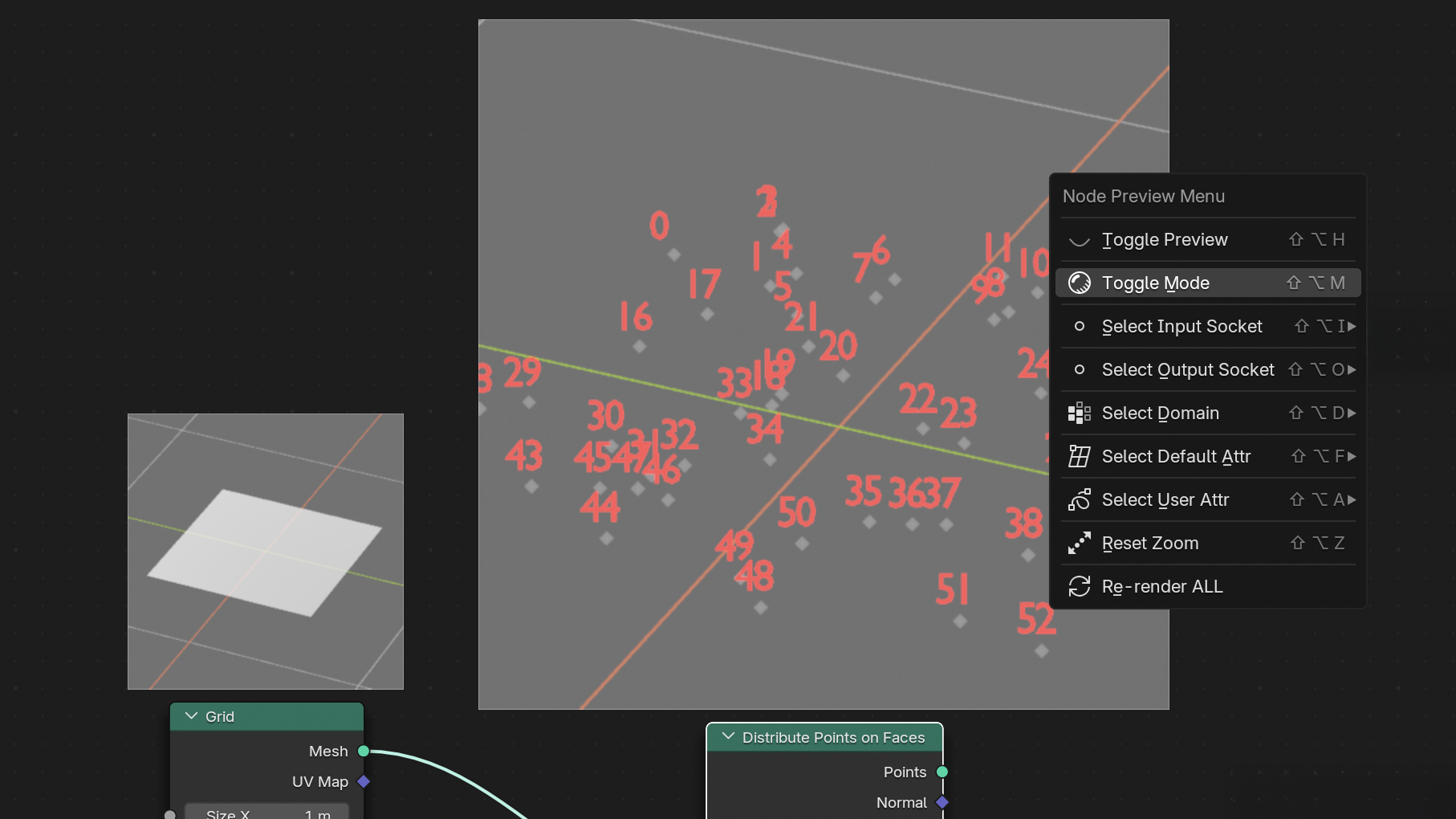
If a preview isn’t detailed enough for the node? You can switch between fast low-res mode (default) and a sharper high-res mode for complex geometry. Both modes are fully configurable in the add-on settings, so you can tune preview quality to match your workflow.

Performance First

Preview-it™ is built to be fast — really fast. A separate background process handles all rendering and calculations, while the add-on’s smart caching system ensures your computer never feels heavy. Edit your graph, move the preview camera, tweak values — Blender stays smooth the entire time.

And for very complex scenes or heavy meshes, you have a full control — adjust preview resolution, change update rate, enable camera culling, or pause previews instantly whenever you need better prerformace.

Note for MacOS users: you will see an extra bouncing Blender icon in the Dock. This is expected — the background process launches a separate Blender instance to run the EEVEE rendering environment, and macOS shows each instance as its own app.

What’s missing in the beta?

  • Grease Pencil in Geometry Nodes are not supported yet, but already on the roadmap.
  • New Blender 5.0 Geometry Nodes features are currently in development.
  • Visualization for “hidden-logic” nodes: Geometry Proximity (show nearest points and distances), Raycast (display rays and hit points), Index of Nearest / Sample Nearest (reveal nearest-neighbor pairs), Sample Index (preview exactly what you’re sampling), Sample Nearest Surface, and more — currently in development.
  • Currently only geometry-type output sockets can be previewed — support for value, vectors, and matrix sockets type is on the way.
  • Heatmap mode — upcoming feature for quick visual debugging of numeric fields.
  • Support Shader Editor: Shader View add-on will be merged into Preview-it™ so you will be able to preview material shader nodes as well. This will make possible to preview attribute-driven shading inside materials — something that existing Shader View or Node Preview add-ons cannot do, because it requires actual geometry data.
  • Support for Blender versions 4.0 – 4.2.

All of these features are already on the roadmap — and every early-access buyer receives them as free updates.

What people are saying

Preview-it™ in Practice

Early impressions from users who’ve tried add-on in their workflows.

Easy installation, initial tests didn't work (I had to disable and re-enable it in the add-ons panel for it to function properly – possibly related to my Blender configuration). Since that minor issue, this plugin is simply... excellent.

For anyone who wants to work with geonodes, it's just perfect.

Whiskey
★★★★★  5/5

This is a brilliant addon! It's a huge time and effort saver when working with Nodes. It's incredibly easy to work with, and the visual clarity makes it easy to understand and avoid getting lost in the data: look and you'll see what, where, how, and where from. The addon is absolutely worth the money. I'm eagerly awaiting updates, as the author always offers exciting features and interesting solutions. Tested! MY PERSONAL RATING: 12/10. DIVINE

Andrey
★★★★★  5/5

I don't usually use Geometry Nodes, so I don't really understand it. This add-on is very helpful because it helps me understand it visually. I think it's a really useful add-on, especially for those who are just starting to learn Geometry Nodes. I'm glad I bought it.

nakamura
★★★★★  5/5
Limited Time Offer

Early Bird Beta Pricing

$25 $60

All core workflows are tested and stable, but as with any early-access releases, there may still be a few unexpected bugs or edge-case behaviors that will be fixed during the beta.

The price will rise toward ~$60 as more roadmap features roll out.
Refund policy: if Preview-it™ add-on cannot run properly and we can’t fix it, you’ll get a full refund within 30 days of purchase.

Every Purchase Supports Blender

When you purchase Preview-it™, you’re directly helping push Blender forward. Part of every sale is contributed to the Blender Development Fund , supporting the developers who keep Blender free, powerful, and open-source for all of us.

FAQ

What Blender versions are supported?

Preview-it™ is tested on Blender 4.3 through 5.0 on macOS, Windows, and Linux. All core features work in 5.0 — the add-on runs normally as long as you’re not using the newest 5.0-specific Geometry Nodes features. Support for those new 5.0 features is actively in development and will be added during the beta.

Will free updates continue after v1.0?

Yes. You will continue receiving free updates beyond v1.0. All compatibility updates for new Blender versions are included as well — you won’t need to pay again just to keep the add-on working on future Blender releases.

Will Grease Pencil in Geometry Nodes be supported?

Yes. Grease Pencil in GN is already on the roadmap and will arrive before the full 1.0 launch.

Will Preview-it include all the features of ShaderView add-on?

Yes. The full 1.0 release will include all Shader View features and even more — such as attribute-driven material previews and texture previews directly inside the Geometry Nodes editor. If you get Preview-it, you won’t need to buy Shader View later — the goal is to unify everything into one tool.

Does it modify my node tree?

No. Preview-it™ is completely non-destructive. It evaluates your node tree and draws previews on top of nodes, but it never inserts, deletes, or edits any nodes, links, or scene data.

Will it slow down Blender?

Previews are rendered in a separate background process, and the add-on uses a smart caching system to avoid unnecessary re-rendering. You can lower resolution, reduce update rate, or hide previews entirely when working on heavy scenes — so you stay fully in control of performance.

Does it work with all Geometry Nodes?

Not yet. Currently, it can preview only nodes that output geometry. Support for value, vector, and matrix previews is planned for upcoming updates.

Does it preview materials or textures?

Not yet. Right now, materials and textures are ignored — previews focus only on geometry and attribute data. Once ShaderView Add-on will be merged into Preview-it™, full material and texture previews will be supported as well.