Live preview for your selected node🧡 $2 · 100% to Blender Fund
Shader Node Preview Lite is a simplified, low-cost version of Shader View. It gives you a real-time preview of the currently selected shader node — so you can instantly see what a node is doing without constantly rewiring your material.
It uses the same way as Shader View, but with one key limitation: only one node can be previewed at a time. Perfect if you want to try the workflow, learn shaders, or keep things super lightweight.
100% (except Superhive commission) goes directly to the Blender Development Fund. You're not paying me — you're supporting Blender. 🧡
100% of the $2 price is donated to the Blender Development Fund. Every cent goes directly to fund.blender.org to support core Blender development. I keep nothing — you get the add-on, Blender gets the support.
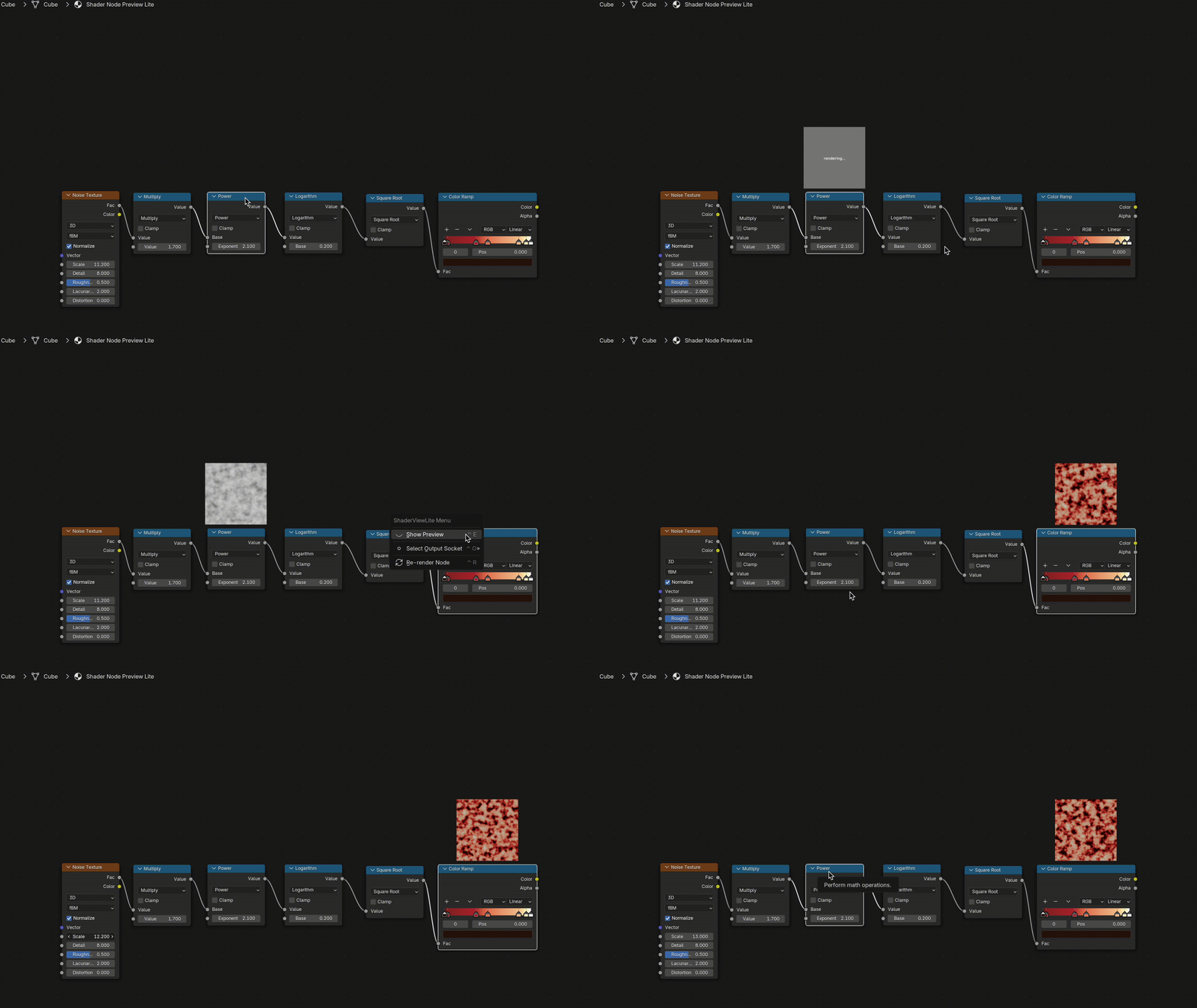
What Lite gives you
- check_boxSingle-node live preview — always see the output of the node you’re working on.
- check_boxReal-time updates — tweak values and instantly see the result on the material.
- check_boxOutput Socket Selector — preview color, factor, normal and other sockets.
- check_boxNon-destructive — the add-on never touches your node tree or scene data.
Lite vs. Full
Lite is a great starting point — $2, with every cent donated to the Blender Development Fund. If you need more control, power, and debugging tools, you can upgrade to the Standard or Pro version of Shader View at any time.
Lite 🧡
Try the add-on. Support Blender.
100% donated to the Blender Dev Fund.
- ✔️Real-time preview update
- ✔️Output Socket Selector
- ❌Multi-node previews
- ❌Preview customization per-node
- ❌Performance controls
- ❌Scalar grid / Min–Max analysis
Standard
For everyday material work
Core Shader View experience with multi-node previews.
- ✔️Real-time multi-node previews
- ✔️Output Socket Selector
- ✔️Global preview size & resolution controls
- ✔️Performance controls (limited)
- ✔️UDIM support (active tile)
- ❌Scalar grid, vector splitting, smart masking
- errorIncludes all features available in the Node Preview Add-on
Pro
Full control & deep debugging
Everything in Standard, plus advanced analysis tools.
- ✔️Full performance controls
- ✔️Switch all UDIM tiles
- ✔️Script Node support
- ✔️Smart Preview Masking
- ✔️Scalar Features (Grid, Min/Max, real values)
- ✔️Vector splitting & Smart Zoom
What you get in the full Shader View
While Lite focuses on a single selected node, the full Shader View add-on turns your Shader Editor into a complete visual map of your material. You can see how colors, masks, and textures flow through the entire graph — all at once.
- check_boxMulti-node previews across your whole shader tree.
- check_boxScalar Map features — value grid, Min/Max readouts, heatmap for negative / overbright values.
- check_boxSmart Preview Masking — previews avoid overlapping your nodes.
- check_boxPerformance controls — resolution, update rate, chunking for heavy node trees.
- check_boxUDIM tools, Script Node support, Smart Zoom, Vector splitting and more.
If you like how Lite feels, the full version is the natural next step when you’re ready to push your materials deeper and work faster.
Wish Shader View existed for Geometry Nodes? Now it does.
Meet Preview-it™ Add-on — real-time previews for everything inside your Geometry Tree: geometry shapes, field values, attribute flow, selection masks, and more. All without constantly checking the viewport, wiring temporary viewers, or digging through the spreadsheet
🔥 Limited-Time Launch: 60% OFF Early AccessDone with shaders? Now paint the light.
Meet Light Painter — a brand-new way to light your scenes in Blender. Paint light directly on your viewport in real time, with layers, blend modes, and full non-destructive control. Stop fighting lights — shape exactly what gets lit and how, like you paint in Photoshop.
Check out Light Painter →FAQ
Where does the $2 actually go?
100% to the Blender Development Fund. I don't keep a cent — the full $2 (minus what Gumroad takes for payment processing) is forwarded directly to fund.blender.org to support core Blender development. If you'd rather donate to Blender directly and grab the add-on after, that works too — just message me on Discord or X.
What Blender versions are supported?
Shader Node Preview Lite uses the same core engine as Shader View and is tested on Blender 3.0 through 5.x on macOS, Windows, and Linux.
Does it modify my node tree?
No. The add-on is completely non-destructive. It evaluates your node tree and draws previews on top of nodes, but never inserts, deletes or edits any nodes, links, or scene data.
Will Lite slow down Blender?
Lite is very lightweight: it renders previews for one selected node. For heavy scenes you can always temporarily disable the add-on, or switch to the full Shader View, which includes advanced performance controls and background processing.
Support & Community
Bugs, questions, or ideas? Reach me on X/Twitter or join the Discord for updates and behind-the-scenes progress and more.